A new Congress, and a lot of questions for AI
I know we just had an election, and I know a lot of you are tired of hearing about it. But this one matters for anyone working with AI, so give me a minute.
AI was a key issue in the election. According to an NBC News exit poll, 56% of voters said AI and data centers were a major factor in their decision, and both the House and Senate will have new leadership in January (Nextgov). The new leaders have already said they will focus on AI early. Here’s what’s being discussed so far:
- More oversight hearings. New committee chairs get subpoena power and control of the agenda. Expect AI and big tech executives to be called in to testify (IAPP).
- Rules for the model makers. Proposals include independent safety reviews before major AI model releases and a new federal body to oversee AI safety.
- Who pays for data centers. The Ratepayer Protection Act, which aims to keep data center costs off household power bills, passed the House in September. Voluntary cost-sharing commitments could become mandatory (Brookings).
Most of these changes target the companies that build AI and operate data centers, not the product stewards who use AI to check an SDS. Since new laws still need the President’s signature, much of this will begin as hearings and news stories before turning into actual rules.
It’s hitting close to home for me, too. Here in Texas, Governor-elect Gina Hinojosa has reportedly said data centers already approved can finish, while new permits face tighter conditions (TokenPost). And with SpaceX’s Terafab project going up in Grimes County, just down the road from me in Bryan/College Station, I’ll be watching closely to see how all of this plays out locally.
AI tip of the week: Compare two SDS versions in 60 seconds
Your supplier sends a new SDS with a short note: "Updated SDS attached, please file." It’s twelve pages long, and Section 16 barely says what changed. Sound familiar?
How to do it
Open ChatGPT (or any other AI tool) and start a new chat.
Upload both PDFs: the old version and the new version.
Paste the prompt below and hit enter.
Spot-check the flagged changes against the PDFs.
The prompt (copy and paste)
Compare these two Safety Data Sheets for the same product. The first is the old version, the second is the new version.
1. At the top, list the changes that matter most: hazard classification, H and P statements, composition (CAS numbers and concentration ranges), exposure limits in Section 8, and transport info in Section 14.
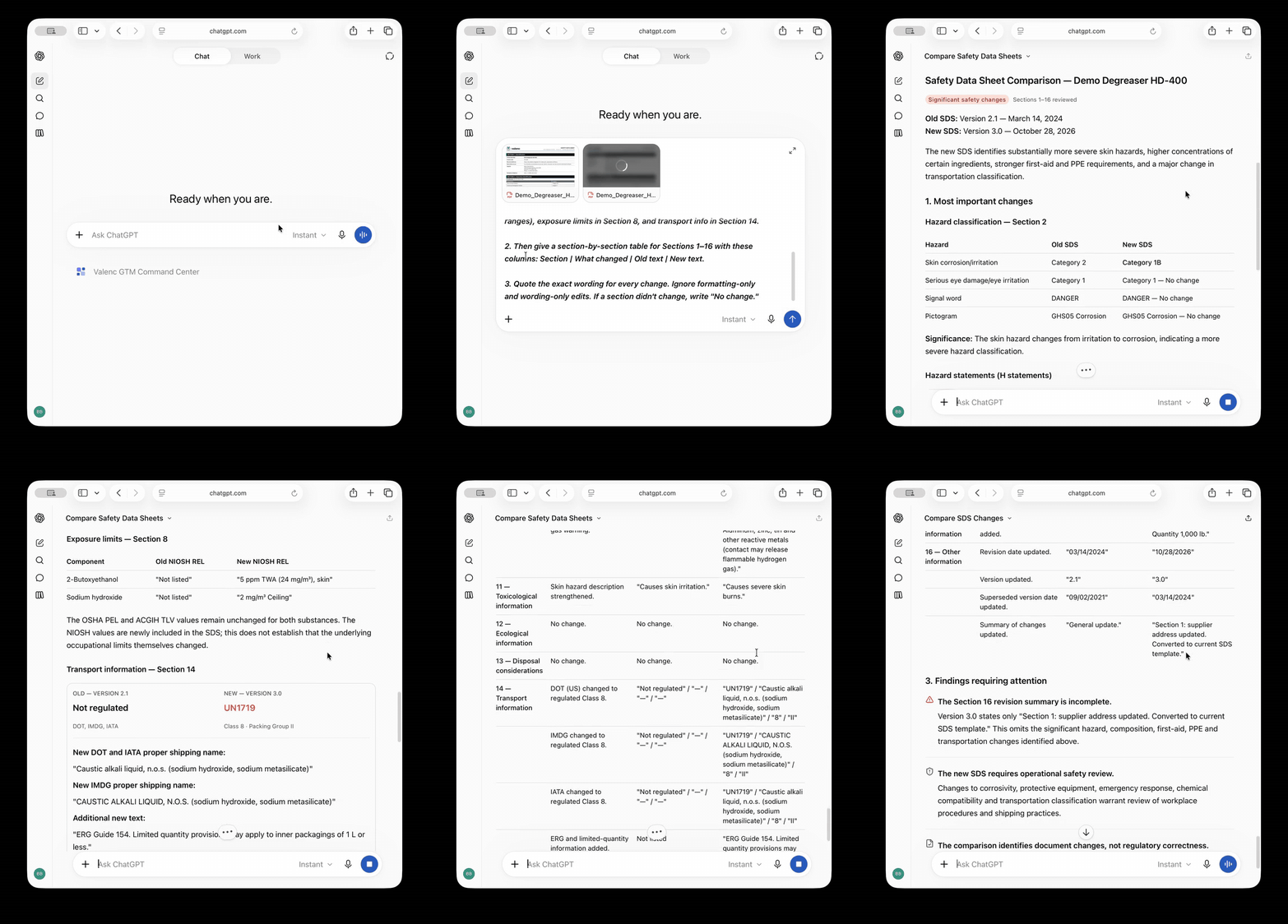
2. Then give a section-by-section table for Sections 1–16 with these columns: Section | What changed | Old text | New text.
3. Quote the exact wording for every change. Ignore formatting-only and wording-only edits. If a section didn't change, write "No change."
What it caught
To test it, I built a sample pair of SDSs for a fictional heavy-duty degreaser. The supplier's revision note in Section 16 mentions one change: an updated address. The comparison found more than ten, including:
- Section 2: skin classification moved from Skin Irritation Category 2 to Skin Corrosion Category 1B (H315 and H318 replaced by H314).
- Section 3: 2-butoxyethanol went from 5–10% to 10–30%, and a new ingredient (tetrasodium EDTA) appeared.
- Section 8: a new NIOSH REL, and eye protection upgraded from safety glasses to goggles and a face shield.
- Section 14: "Not regulated" became UN1719, Class 8, Packing Group II.
- Section 7: a reworded handling sentence was correctly ignored, since the meaning didn't change.
That change in Section 14 alone affects how you ship, label, and store the product. It’s the kind of detail that can be hidden by a simple "general update."
Before you trust it
- Use quotes for changes. Showing the exact old and new wording helps you check each change against the PDF quickly. AI highlights the change, and you confirm it.
- Stick to text-based PDFs. Scanned or image-only files can cause problems. If the output seems incomplete, that's often the reason.
- Double-check revision dates. Be sure you're comparing the correct versions before taking any action.
- Watch your data. Supplier SDSs are usually safe to upload, but check your company's policies before uploading any confidential formulas.
AI news this week
AI found 948 software bugs in one run. A new OpenAI model reportedly found, checked, and wrote fixes for 948 Linux security bugs in one automated process, costing about $1.2M in compute. (TechRadar)
Why it matters: AI is now very good at spotting problems in large documents and codebases. The same approach works for compliance: let AI find the issues, then have a human review and approve each one.
OpenAI will pay its own data center power bills. The company says it will cover all power and infrastructure costs at its owned data centers and will stop signing NDAs with public officials. (Boston Globe)
Why it matters: Local communities strongly opposed data center costs in this election. Expect AI vendors to keep focusing on cost and transparency.
Anthropic signed its first news licensing deal. The company reportedly licensed real-time, attributed election data from the Associated Press, marking its first content licensing agreement with a news publisher. (Adweek)
Why it matters: AI tools are starting to give answers that name their sources. This is the standard you should expect for regulatory questions as well.
CrowdStrike is buying AI monitoring companies. The company is reportedly paying $495M for Fiddler AI and Dreadnode, both of which focus on monitoring and testing AI systems. (GovInfoSecurity)
Why it matters: Monitoring your AI's actions is becoming a new product category. Your IT and security teams will want to know about it.
If Section 17 saved you some time this week, forward it to another product steward. They can subscribe right here on LinkedIn.
See you next Thursday.
Brett Brewer